Map View
See every job on the map. Plan smarter routes.
Visualize your entire workday on an interactive map. See where your crew is, plan efficient routes, and assign nearby jobs — all from one screen.
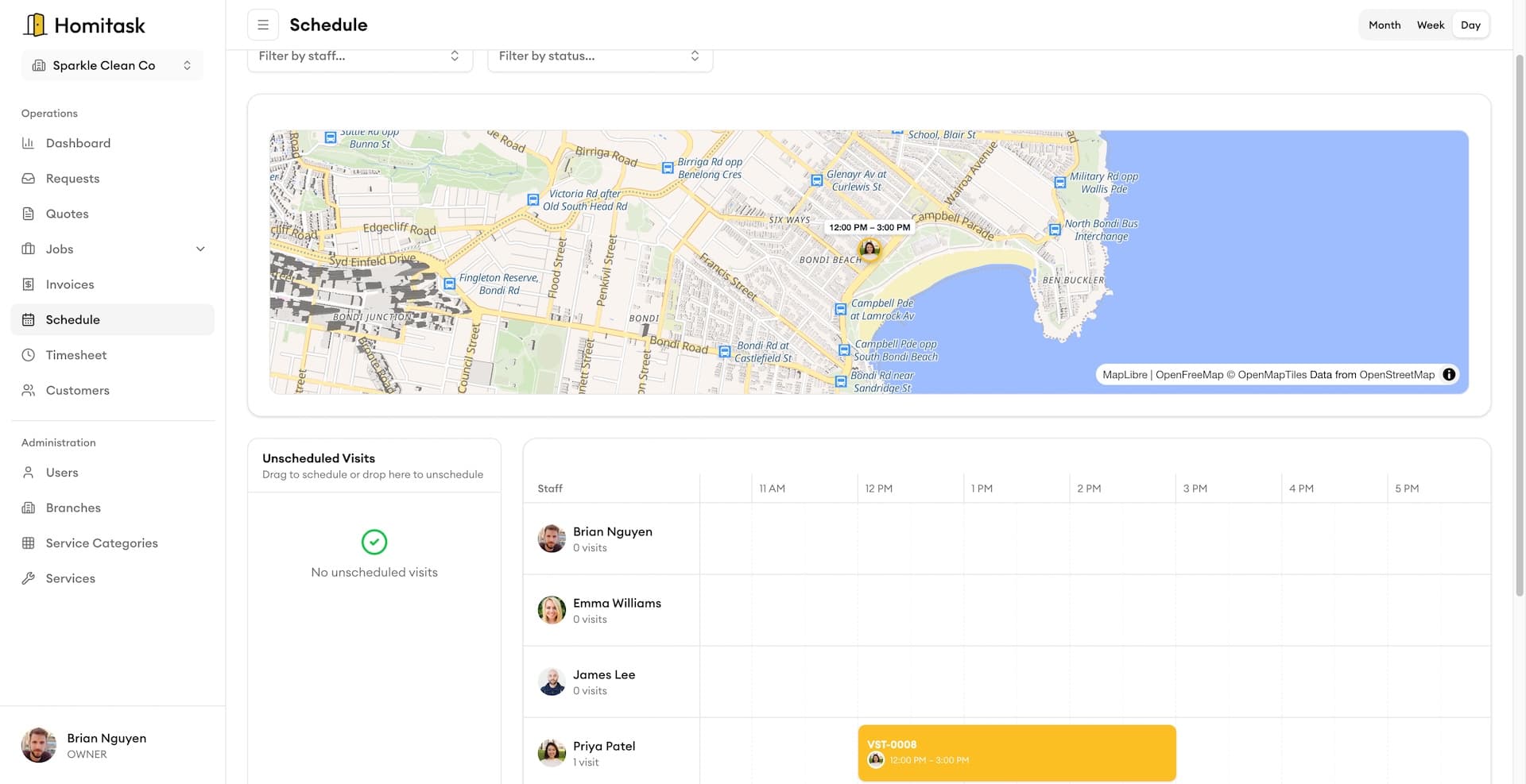
Interactive Job Map
See all your jobs on a live map
Every scheduled job appears as a pin on your map, color-coded by status. Tap any pin to see job details, crew assignment, and customer info without leaving the map view.
Tech Locations
Know where your team is in real-time
See each technician's live location on the map alongside upcoming jobs. Quickly identify who's closest to an urgent call and reassign on the fly.
Address Geocoding
Every address, pinpointed perfectly
Type a customer address and Homitask resolves it to precise GPS coordinates instantly. Drag the pin on the map to confirm the exact entrance or unit. Your crew gets one-tap directions straight from the job card — no copying and pasting addresses.
What our customers say

“The quoting feature won us three jobs in the first week. We send professional quotes from the job site before our competitors even pick up the phone.”
Marcus J.
Owner
ThermalPro Services

“Invoicing used to take our office half a day every Friday. Now it's done in minutes. Homitask pays for itself.”
Jennifer R.
Office Manager
AllSeason Air

“Saved us 15 hours a week on scheduling alone. My crew picked it up in a day — no training needed.”
Mike S.
Owner
Sullivan Plumbing Co.

“The map view cut our drive time by 30 percent. We fit two extra jobs into every day now.”
Lisa A.
Dispatcher
AquaFlow Plumbing

“My plumbers love the mobile app. They see the schedule, job details, and directions — no more calls back to the office.”
Peter W.
Owner
PipeMaster Pro
More tools to grow your business

Job Scheduling
Drag-and-drop calendar to schedule jobs and assign your crew in seconds.
Learn more
GPS Time Tracking
Track clock-ins with GPS verification so you know who's on-site.
Learn more
Route Optimization
Automatically build the fastest multi-stop route for your crew's day.
Learn more
Team Management
Organize crews into groups with managers, schedules, and permissions.
Learn more
Service Area Setup
Define the areas you serve and get alerts for out-of-zone requests.
Learn more
KPI Dashboard
Track drive time, jobs per day, territory coverage, and more.
Learn moreReady to simplify your scheduling?
Stop wasting hours on paperwork. Start scheduling smarter and get back to growing your business.
Frequently asked questions
How does the interactive map work?
The map displays all your scheduled jobs as color-coded pins. You can filter by date, status, team member, or territory. Tap any pin to see full job details, customer info, and crew assignment — and make changes right from the map.
Can I see my technicians' live locations?
Yes. When your crew has the Homitask mobile app open, their real-time location appears on your map. This makes it easy to dispatch the nearest technician to urgent or same-day jobs.
How does route planning save time?
Homitask calculates the fastest order for your crew's stops based on traffic and distance. Most teams save 30 minutes to an hour of drive time per day, which means more billable jobs and lower fuel costs.
What is job clustering?
Job clustering groups nearby jobs together on the map so you can schedule them back-to-back. This reduces time spent driving between sites and helps your crew complete more jobs in a single trip.
Can I set up custom service territories?
Yes. Draw zones directly on the map and assign teams or individual techs to each territory. Homitask tracks coverage, highlights gaps, and helps you balance workload across your service area.
Does the map work on mobile?
Yes. Your field crew can view their assigned jobs on a mobile-optimized map, get turn-by-turn directions, and update job status — all from the Homitask app on their phone.